n8n Connector Guide
The n8n connector enables Tealfabric workflows to trigger automations, manage workflow resources, and inspect execution outcomes through n8n APIs. It is useful when you need centralized orchestration across multiple systems while keeping execution state visible to business processes.
Document information
| Field | Value |
|---|---|
| Canonical URL | /docs/04_connecting-systems/connectors/n/n8n |
| Version (published date) | 2026-05-08 |
| Tags | connectors, reference, n8n |
| Connector ID | n8n-1.0.0 |
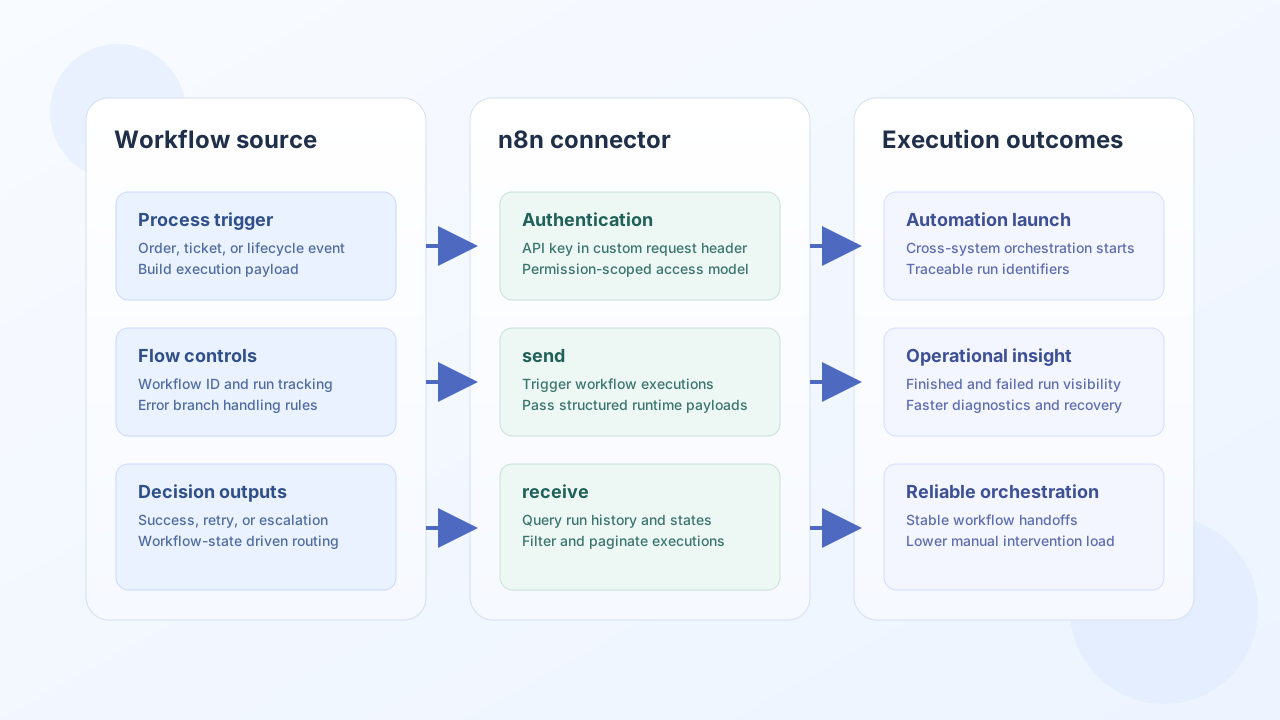
Configuration and authentication
Configure your n8n instance URL and API key so Tealfabric can call n8n endpoints consistently. Use a dedicated key with least-privilege permissions for production integrations.
base_url(required): n8n instance URL, such ashttps://n8n.example.com.api_key(required): n8n API key.timeout_seconds(optional): request timeout value (default30).
The connector authenticates using the X-N8N-API-KEY header. Requests are sent to {base_url}/api/v1/{endpoint}. Run test before enabling production workflows to verify connectivity and credentials.
test is the only operation that validates required configuration up front; send, receive, and execute follow legacy behavior and attempt the HTTP call with loaded config values.
Trigger workflows with send
Use send when a Tealfabric process needs to call an n8n REST endpoint with a JSON body (default HTTP method POST). Provide the path relative to /api/v1/ in endpoint.
const baseUrl = "https://api.example.com/api/v1";
const tenantId = "<TENANT_ID>";
const apiKey = "<API_KEY>";

async function executeN8nWorkflow(integrationId: string) {
  const response = await fetch(`${baseUrl}/integrations/${encodeURIComponent(integrationId)}/execute`, {
    method: "POST",
    headers: {
      "X-API-Key": apiKey,
      "X-Tenant-ID": tenantId,
      "Content-Type": "application/json",
    },
    body: JSON.stringify({
      operation: "send",
      endpoint: "workflows/<ENTITY_ID>/execute",
      method: "POST",
      data: {
        order_id: "ORD-1007",
        customer_id: "CUST-2001",
      },
    }),
  });
  if (!response.ok) throw new Error(`Request failed: ${response.status}`);
  return response.json();
}
curl -X POST "https://api.example.com/api/v1/integrations/<ENTITY_ID>/execute" \
-H "X-API-Key: <API_KEY>" \
-H "X-Tenant-ID: <TENANT_ID>" \
-H "Content-Type: application/json" \
-d '{
"operation": "send",
"endpoint": "workflows/<ENTITY_ID>/execute",
"method": "POST",
"data": {
"order_id": "ORD-1007",
"customer_id": "CUST-2001"
}
}'
{
  "success": true,
  "data": {
    "message": "n8n operation completed successfully",
    "result": {
      "data": {
        "executionId": "<ENTITY_ID>"
      }
    }
  }
}
Retrieve execution data with receive
Use receive to issue GET requests against n8n API paths. When the API returns a top-level data field, that value is returned as items; otherwise the full decoded response is wrapped in a single-element array.
const baseUrl = "https://api.example.com/api/v1";
const tenantId = "<TENANT_ID>";
const apiKey = "<API_KEY>";

async function listExecutions(integrationId: string) {
  const response = await fetch(`${baseUrl}/integrations/${encodeURIComponent(integrationId)}/execute`, {
    method: "POST",
    headers: {
      "X-API-Key": apiKey,
      "X-Tenant-ID": tenantId,
      "Content-Type": "application/json",
    },
    body: JSON.stringify({
      operation: "receive",
      endpoint: "executions",
      query: {
        workflowId: "<ENTITY_ID>",
        limit: 20,
      },
    }),
  });
  if (!response.ok) throw new Error(`Request failed: ${response.status}`);
  const payload = await response.json();
  return payload.data?.items ?? [];
}
curl -X POST "https://api.example.com/api/v1/integrations/<ENTITY_ID>/execute" \
-H "X-API-Key: <API_KEY>" \
-H "X-Tenant-ID: <TENANT_ID>" \
-H "Content-Type: application/json" \
-d '{
"operation": "receive",
"endpoint": "executions",
"query": {
"workflowId": "<ENTITY_ID>",
"limit": 20
}
}'
{
  "success": true,
  "data": {
    "message": "n8n data retrieved successfully",
    "workflow_count": 2,
    "items": [
      {
        "id": "<ENTITY_ID>",
        "workflowId": "<ENTITY_ID>",
        "finished": true
      }
    ]
  }
}
Call arbitrary API methods with execute
Use execute for any HTTP verb against an n8n API path. The request body is taken from body when present, otherwise from data (default method GET).
{
  "operation": "execute",
  "endpoint": "workflows/<ENTITY_ID>",
  "method": "GET"
}
{
  "success": true,
  "data": {
    "message": "n8n method executed successfully",
    "result": {
      "data": {
        "id": "<ENTITY_ID>",
        "name": "Order processing"
      }
    }
  }
}
Test connectivity with test
test validates base_url and api_key, then probes the workflows list endpoint (legacy path api/v1/workflows, resolved under /api/v1/ like other operations).
{
  "operation": "test"
}
{
  "success": true,
  "data": {
    "message": "n8n connection test successful",
    "details": {
      "base_url": "https://n8n.example.com",
      "workflows_found": 12
    }
  }
}
When configuration is invalid, test returns Configuration validation failed (matching legacy testConnection behavior).
Reliability guidance
Most production issues come from revoked API keys, overly broad execution queries, or unhandled transient errors. Rotate API keys regularly, scope queries with filters and pagination, and add retry with backoff for timeout or rate-limit responses.
These practices help keep automation orchestration stable as run volume increases.