New Relic Connector Guide
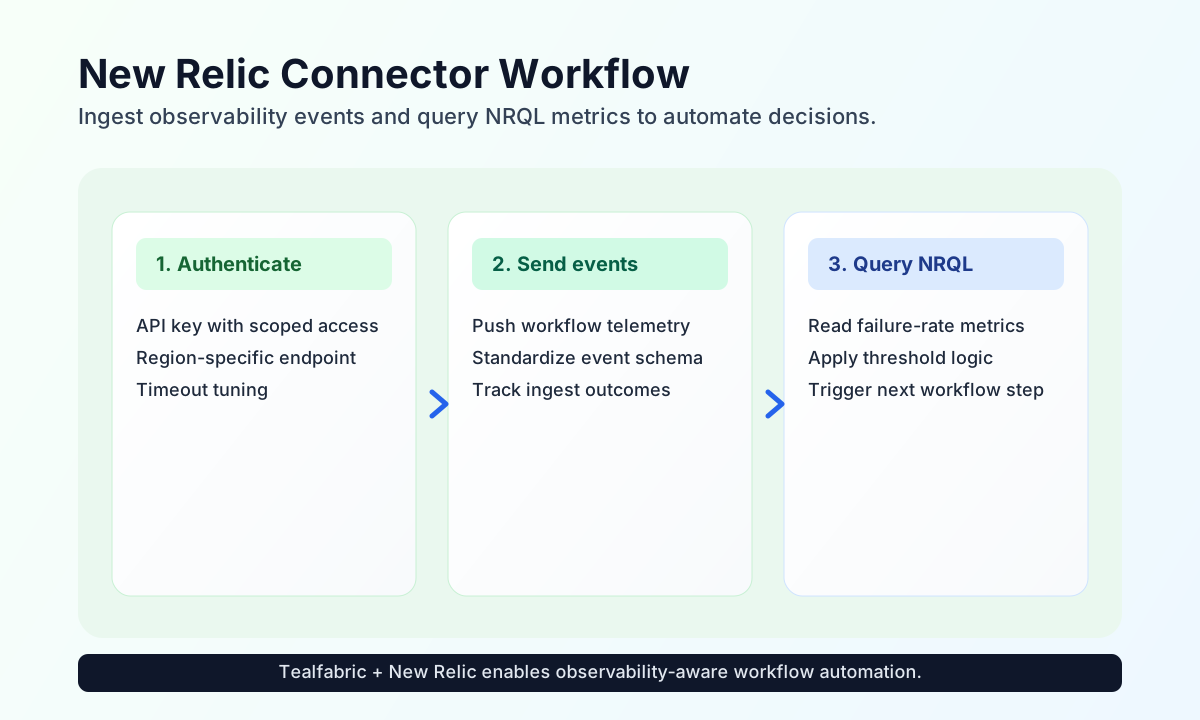
The New Relic connector lets Tealfabric workflows send observability events and query telemetry for automation decisions. It is useful when workflows need to report runtime outcomes, monitor service behavior, and trigger follow-up steps based on NRQL query results.
Document information
| Field | Value |
|---|---|
| Canonical URL | /docs/04_connecting-systems/connectors/n/newrelic |
| Version (published date) | 2026-05-08 |
| Tags | connectors, reference, newrelic |
| Connector ID | newrelic-1.0.0 |
Configure API credentials and region
Configure the connector with your New Relic api_key so workflow requests can authenticate against New Relic APIs. Set the region value for your account context, typically US or EU, and adjust timeout_seconds for larger query responses when needed.
To keep automation secure, use a key scoped to ingest and query capabilities required by your workflows rather than broad account-level access.
Send custom telemetry with send
Use send to push operational events from workflow steps into New Relic for centralized observability. This is commonly used for workflow outcome tracking, external-call latency reporting, and alert correlation.
const baseUrl = "https://api.example.com/api/v1";
const tenantId = "<TENANT_ID>";
const apiKey = "<API_KEY>";

async function sendWorkflowEvent(integrationId: string) {
  const response = await fetch(`${baseUrl}/integrations/${encodeURIComponent(integrationId)}/execute`, {
    method: "POST",
    headers: {
      "X-API-Key": apiKey,
      "X-Tenant-ID": tenantId,
      "Content-Type": "application/json",
    },
    body: JSON.stringify({
      operation: "send",
      endpoint: "v1/accounts/events",
      data: {
        eventType: "WorkflowExecution",
        workflowName: "order-fulfillment",
        status: "success",
        durationMs: 942
      }
    }),
  });
  if (!response.ok) throw new Error(`Request failed: ${response.status}`);
  return response.json();
}
curl -X POST "https://api.example.com/api/v1/integrations/<ENTITY_ID>/execute" \
-H "X-API-Key: <API_KEY>" \
-H "X-Tenant-ID: <TENANT_ID>" \
-H "Content-Type: application/json" \
-d '{
"operation": "send",
"endpoint": "v1/accounts/events",
"data": {
"eventType": "WorkflowExecution",
"workflowName": "order-fulfillment",
"status": "success",
"durationMs": 942
}
}'
{
  "success": true,
  "data": {
    "message": "New Relic operation completed successfully",
    "result": {
      "accepted": true
    }
  }
}
Query telemetry with receive
Use receive to run filtered reads against New Relic data and drive branching logic in workflows. NRQL-based query results are especially useful for threshold checks, reliability automation, and incident routing.
const baseUrl = "https://api.example.com/api/v1";
const tenantId = "<TENANT_ID>";
const apiKey = "<API_KEY>";

async function queryFailureRate(integrationId: string) {
  const response = await fetch(`${baseUrl}/integrations/${encodeURIComponent(integrationId)}/execute`, {
    method: "POST",
    headers: {
      "X-API-Key": apiKey,
      "X-Tenant-ID": tenantId,
      "Content-Type": "application/json",
    },
    body: JSON.stringify({
      operation: "receive",
      endpoint: "graphql",
      query: {
        nrql: "SELECT percentage(count(*), WHERE status = "failed") FROM WorkflowExecution SINCE 30 minutes ago"
      }
    }),
  });
  if (!response.ok) throw new Error(`Request failed: ${response.status}`);
  return response.json();
}
curl -X POST "https://api.example.com/api/v1/integrations/<ENTITY_ID>/execute" \
  -H "X-API-Key: <API_KEY>" \
  -H "X-Tenant-ID: <TENANT_ID>" \
  -H "Content-Type: application/json" \
  -d '{
    "operation": "receive",
    "endpoint": "graphql",
    "query": {
      "nrql": "SELECT percentage(count(*), WHERE status = '\''failed'\'') FROM WorkflowExecution SINCE 30 minutes ago"
    }
  }'
{
  "success": true,
  "data": {
    "message": "New Relic data retrieved successfully",
    "result": {
      "data": {
        "actor": {
          "account": {
            "nrql": {
              "results": [
                {
                  "percentage.count": 2.4
                }
              ]
            }
          }
        }
      }
    }
  }
}
Test connection with test
Use test to validate api_key and region configuration. The connector probes GET v2/users and returns the resolved API base URL and region in data.details. Only test enforces required-parameter validation; send and receive rely on runtime API responses when configuration is incomplete.
{
  "success": true,
  "data": {
    "message": "New Relic connection test successful",
    "details": {
      "api_base_url": "https://api.newrelic.com",
      "region": "US"
    }
  }
}
Reliability guidance
Most failures come from invalid API keys, region mismatch, or rate-limit responses under burst traffic. If requests fail, validate credential scope and region first, then apply retry with exponential backoff for transient throttling.
For stable production behavior, keep event schemas consistent, bound query windows, and monitor ingest and query latency over time. This helps workflows remain predictable when telemetry volume grows.