YAML File Connector Guide
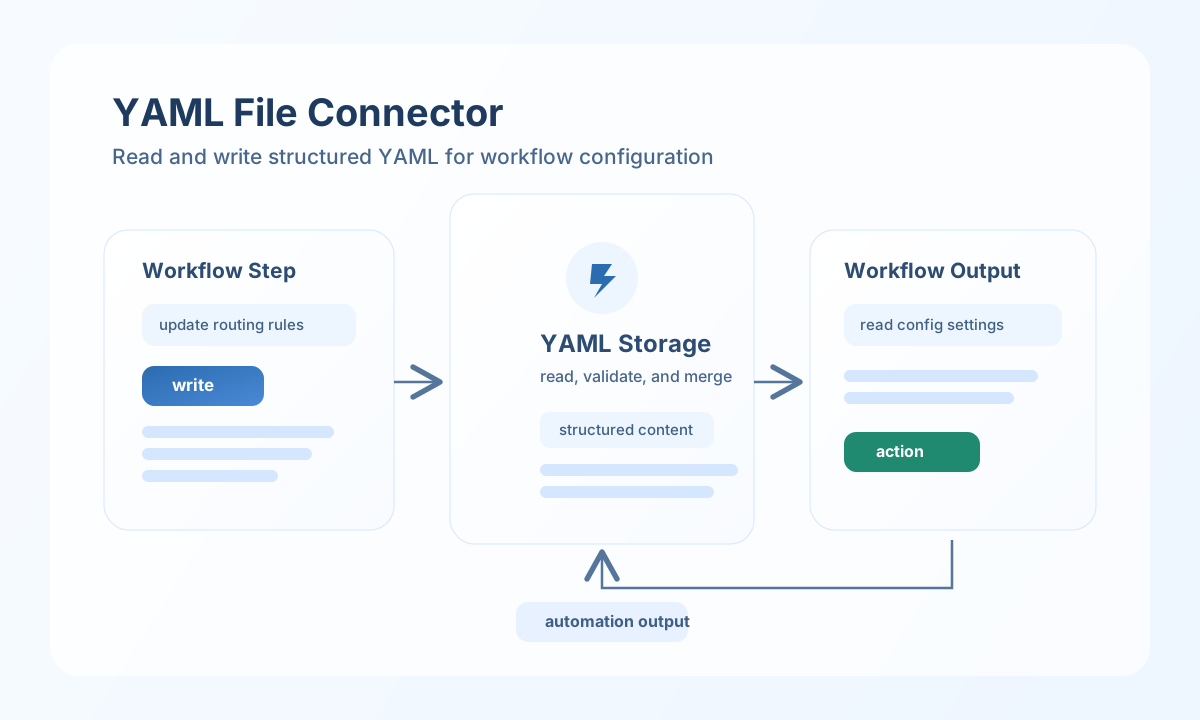
The YAML File connector lets Tealfabric workflows read, write, validate, and merge YAML documents stored in tenant file storage. It is useful for configuration-driven automation, structured metadata files, and workflow state persisted in human-readable format.
Document information
| Field | Value |
|---|---|
| Canonical URL | /docs/04_connecting-systems/connectors/y/yaml-file |
| Version (published date) | 2026-05-08 |
| Tags | connectors, reference, yaml-file |
| Connector ID | yaml-file-1.0.0 |
Configuration
Configure the connector with a target YAML filename and, optionally, a relative folder path inside tenant storage (storage/<tenant_id>/). Paths must not contain ..; the runtime rejects traversal outside tenant storage.
filename(required): YAML file name, for exampleworkflow-config.yaml.path(optional): Relative directory, for exampleconfigs/automation.
Run test after configuration to verify the file is readable valid YAML or that the parent directory is writable when the file does not yet exist.
Read YAML content with read
Use read to load parsed YAML into workflow steps. The connector returns the parsed document under data.data.
const baseUrl = "https://api.example.com/api/v1";
const tenantId = "<TENANT_ID>";
const apiKey = "<API_KEY>";

async function readWorkflowConfig(integrationId: string) {
  const response = await fetch(`${baseUrl}/integrations/${encodeURIComponent(integrationId)}/execute`, {
    method: "POST",
    headers: {
      "X-API-Key": apiKey,
      "X-Tenant-ID": tenantId,
      "Content-Type": "application/json",
    },
    body: JSON.stringify({
      operation: "read",
      filename: "workflow-config.yaml",
      path: "configs/automation"
    }),
  });
  if (!response.ok) throw new Error(`Request failed: ${response.status}`);
  return response.json();
}
curl -X POST "https://api.example.com/api/v1/integrations/<ENTITY_ID>/execute" \
-H "X-API-Key: <API_KEY>" \
-H "X-Tenant-ID: <TENANT_ID>" \
-H "Content-Type: application/json" \
-d '{
"operation": "read",
"filename": "workflow-config.yaml",
"path": "configs/automation"
}'
{
  "success": true,
  "data": {
    "message": "YAML file read successfully",
    "data": {
      "routing": {
        "default_channel": "ops"
      }
    }
  }
}
Write YAML content with write
Use write to create or update structured YAML files from workflow output. Pass the payload in data; parent directories are created automatically.
const baseUrl = "https://api.example.com/api/v1";
const tenantId = "<TENANT_ID>";
const apiKey = "<API_KEY>";

async function writeWorkflowConfig(integrationId: string) {
  const response = await fetch(`${baseUrl}/integrations/${encodeURIComponent(integrationId)}/execute`, {
    method: "POST",
    headers: {
      "X-API-Key": apiKey,
      "X-Tenant-ID": tenantId,
      "Content-Type": "application/json",
    },
    body: JSON.stringify({
      operation: "write",
      filename: "workflow-config.yaml",
      path: "configs/automation",
      data: {
        routing: {
          default_channel: "ops",
          severity_threshold: "high"
        },
        notifications: {
          enabled: true
        }
      }
    }),
  });
  if (!response.ok) throw new Error(`Request failed: ${response.status}`);
  return response.json();
}
curl -X POST "https://api.example.com/api/v1/integrations/<ENTITY_ID>/execute" \
-H "X-API-Key: <API_KEY>" \
-H "X-Tenant-ID: <TENANT_ID>" \
-H "Content-Type: application/json" \
-d '{
"operation": "write",
"filename": "workflow-config.yaml",
"path": "configs/automation",
"data": {
"routing": {
"default_channel": "ops",
"severity_threshold": "high"
},
"notifications": {
"enabled": true
}
}
}'
{
  "success": true,
  "data": {
    "message": "YAML file written successfully",
    "file_path": "/storage/tenantdata/<TENANT_ID>/configs/automation/workflow-config.yaml",
    "file_size": 196
  }
}
Validate YAML with validate
Use validate to check inline YAML text or the configured file before downstream steps consume it. When yaml_string is omitted, the connector reads the configured file.
curl -X POST "https://api.example.com/api/v1/integrations/<ENTITY_ID>/execute" \
  -H "X-API-Key: <API_KEY>" \
  -H "X-Tenant-ID: <TENANT_ID>" \
  -H "Content-Type: application/json" \
  -d '{
    "operation": "validate",
    "yaml_string": "routing:\n  default_channel: ops\n"
  }'
{
  "success": true,
  "data": {
    "valid": true,
    "message": "YAML is valid"
  }
}
Invalid YAML returns success: false with error.code REMOTE_PAYLOAD_INVALID and error.details.valid: false.
Merge YAML with merge
Use merge to deep-merge two YAML-compatible structures using PHP array_merge_recursive semantics (nested objects recurse; duplicate scalar keys become arrays). When base is empty and the configured file exists, file contents supply the base. Set write: true to persist the merged result via write.
curl -X POST "https://api.example.com/api/v1/integrations/<ENTITY_ID>/execute" \
  -H "X-API-Key: <API_KEY>" \
  -H "X-Tenant-ID: <TENANT_ID>" \
  -H "Content-Type: application/json" \
  -d '{
    "operation": "merge",
    "filename": "workflow-config.yaml",
    "path": "configs/automation",
    "base": {
      "routing": { "default_channel": "ops" }
    },
    "merge": {
      "notifications": { "enabled": true }
    }
  }'
{
  "success": true,
  "data": {
    "message": "YAML merged successfully",
    "data": {
      "routing": { "default_channel": "ops" },
      "notifications": { "enabled": true }
    }
  }
}
Test file access with test
Use test to confirm the configured path is reachable: existing files must be readable and parse as valid YAML; missing files require a writable parent directory.
curl -X POST "https://api.example.com/api/v1/integrations/<ENTITY_ID>/execute" \
  -H "X-API-Key: <API_KEY>" \
  -H "X-Tenant-ID: <TENANT_ID>" \
  -H "Content-Type: application/json" \
  -d '{
    "operation": "test",
    "filename": "workflow-config.yaml",
    "path": "configs/automation"
  }'
{
  "success": true,
  "data": {
    "message": "YAML file connector test successful",
    "details": {
      "file_path": "/storage/tenantdata/<TENANT_ID>/configs/automation/workflow-config.yaml",
      "file_exists": true
    }
  }
}
Production guidance
Validate YAML before writing when workflow input comes from external systems, because malformed structures can break downstream readers. Keep schema expectations documented and stable so merges and updates remain predictable.
Node yaml (YAML 1.2) may differ slightly from PHP yaml_parse / Symfony YAML on edge cases (anchors, tags, scalar coercion). Use fixture-based comparison when exact byte-level parity with legacy PHP output is required.
Use versioned filenames or backup strategies for critical configuration files, especially when multiple workflows update the same YAML document.