Kubernetes Connector Guide
The Kubernetes connector lets Tealfabric workflows create, update, and inspect cluster resources through the Kubernetes REST API. It is commonly used for deployment automation, namespace-scoped operations, and health-driven workflow decisions.
Document information
| Field | Value |
|---|---|
| Canonical URL | /docs/04_connecting-systems/connectors/k/kubernetes |
| Version (published date) | 2026-05-08 |
| Tags | connectors, reference, kubernetes |
| Connector ID | kubernetes-1.0.0 |
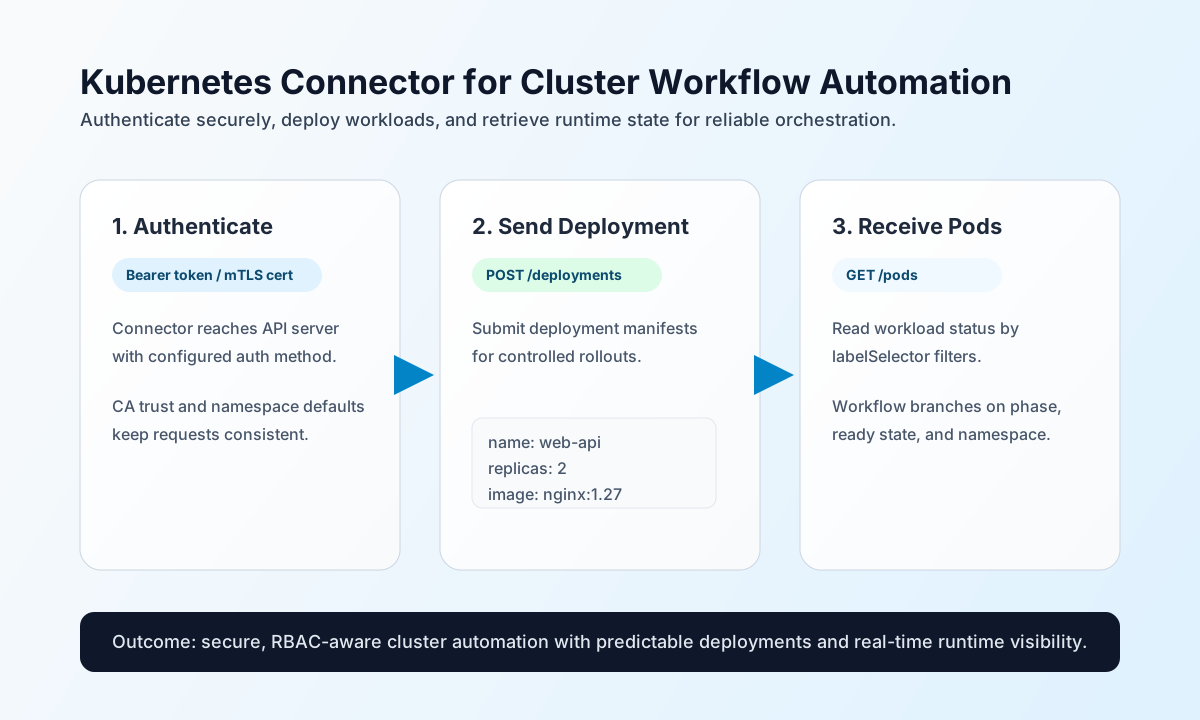
Configure cluster access
Configure the connector with your cluster API endpoint and one supported authentication method so workflow runs can safely reach the Kubernetes control plane. This keeps cluster credentials centralized and avoids exposing secrets in step-level payloads.
Required settings are api_server_url and auth_type (bearer_token or client_cert). Depending on auth_type, provide either bearer_token or the client_cert and client_key pair. Optional settings include ca_cert (used with client_cert for TLS trust), default namespace, and timeout_seconds. Configuration is validated only on test; run test after setup to verify connectivity and authentication.
Create or update resources with send
Use send for resource write operations such as creating deployments or patching workload definitions. Keep endpoint paths and manifests explicit so workflow retries remain deterministic.
const baseUrl = "https://api.example.com/api/v1";
const tenantId = "<TENANT_ID>";
const apiKey = "<API_KEY>";

async function createDeployment(integrationId: string) {
  const response = await fetch(`${baseUrl}/integrations/${encodeURIComponent(integrationId)}/execute`, {
    method: "POST",
    headers: {
      "X-API-Key": apiKey,
      "X-Tenant-ID": tenantId,
      "Content-Type": "application/json",
    },
    body: JSON.stringify({
      operation: "send",
      endpoint: "apis/apps/v1/namespaces/default/deployments",
      method: "POST",
      data: {
        apiVersion: "apps/v1",
        kind: "Deployment",
        metadata: { name: "web-api" },
        spec: {
          replicas: 2,
          selector: { matchLabels: { app: "web-api" } },
          template: {
            metadata: { labels: { app: "web-api" } },
            spec: {
              containers: [
                { name: "web-api", image: "nginx:1.27" }
              }
            }
          }
        }
      }
    }),
  });
  if (!response.ok) throw new Error(`Request failed: ${response.status}`);
  return response.json();
}
curl -X POST "https://api.example.com/api/v1/integrations/<ENTITY_ID>/execute" \
-H "X-API-Key: <API_KEY>" \
-H "X-Tenant-ID: <TENANT_ID>" \
-H "Content-Type: application/json" \
-d '{
"operation": "send",
"endpoint": "apis/apps/v1/namespaces/default/deployments",
"method": "POST",
"data": {
"apiVersion": "apps/v1",
"kind": "Deployment",
"metadata": { "name": "web-api" },
"spec": {
"replicas": 2,
"selector": { "matchLabels": { "app": "web-api" } },
"template": {
"metadata": { "labels": { "app": "web-api" } },
"spec": {
"containers": [
{ "name": "web-api", "image": "nginx:1.27" }
]
}
}
}
}
}'
{
  "success": true,
  "data": {
    "message": "Kubernetes operation completed successfully",
    "result": {
      "kind": "Deployment",
      "metadata": {
        "name": "web-api",
        "namespace": "default"
      }
    }
  }
}
Retrieve cluster state with receive
Use receive to list pods, deployments, or namespace resources for workflow checks and operational reporting. Apply selectors and bounded result sets where possible to keep executions fast and predictable.
const baseUrl = "https://api.example.com/api/v1";
const tenantId = "<TENANT_ID>";
const apiKey = "<API_KEY>";

async function listPods(integrationId: string) {
  const response = await fetch(`${baseUrl}/integrations/${encodeURIComponent(integrationId)}/execute`, {
    method: "POST",
    headers: {
      "X-API-Key": apiKey,
      "X-Tenant-ID": tenantId,
      "Content-Type": "application/json",
    },
    body: JSON.stringify({
      operation: "receive",
      endpoint: "api/v1/namespaces/default/pods",
      query: {
        labelSelector: "app=web-api"
      }
    }),
  });
  if (!response.ok) throw new Error(`Request failed: ${response.status}`);
  return response.json();
}
curl -X POST "https://api.example.com/api/v1/integrations/<ENTITY_ID>/execute" \
-H "X-API-Key: <API_KEY>" \
-H "X-Tenant-ID: <TENANT_ID>" \
-H "Content-Type: application/json" \
-d '{
"operation": "receive",
"endpoint": "api/v1/namespaces/default/pods",
"query": {
"labelSelector": "app=web-api"
}
}'
{
  "success": true,
  "data": {
    "message": "Kubernetes data retrieved successfully",
    "resource_count": 1,
    "items": [
      {
        "metadata": {
          "name": "web-api-6c8d7fb7cb-2l6b9",
          "namespace": "default"
        },
        "status": {
          "phase": "Running"
        }
      }
    ]
  }
}
Run arbitrary API calls with execute
Use execute when you need a non-default HTTP method or a body/data payload shape that does not fit send/receive. The connector validates configuration only during test; runtime operations rely on cluster RBAC and API responses for auth failures.
{
  "operation": "execute",
  "endpoint": "api/v1/namespaces/default/pods/web-api-6c8d7fb7cb-2l6b9",
  "method": "DELETE"
}
Verify connectivity with test
test performs full configuration validation (required api_server_url, auth_type, and credential fields) and probes GET api/v1, expecting kind: APIVersions. On validation failure the connector returns Configuration validation failed, matching legacy test behavior.
{
  "success": true,
  "data": {
    "message": "Kubernetes connection test successful",
    "details": {
      "api_server_url": "https://kubernetes.default.svc",
      "api_versions": 2
    }
  }
}
Reliability and security guidance
Most failures come from RBAC permission gaps, namespace mismatches, and cluster network access issues. If a call fails, verify credentials and role bindings first, then confirm the target namespace and endpoint path, and finally inspect TLS trust settings (ca_cert) for secure cluster access.
For production stability, apply least-privilege RBAC, validate manifests before send operations, and add retry with backoff for transient 429 and timeout responses. These practices reduce noisy failures during rollout and scaling workflows.