Keycloak Connector Guide
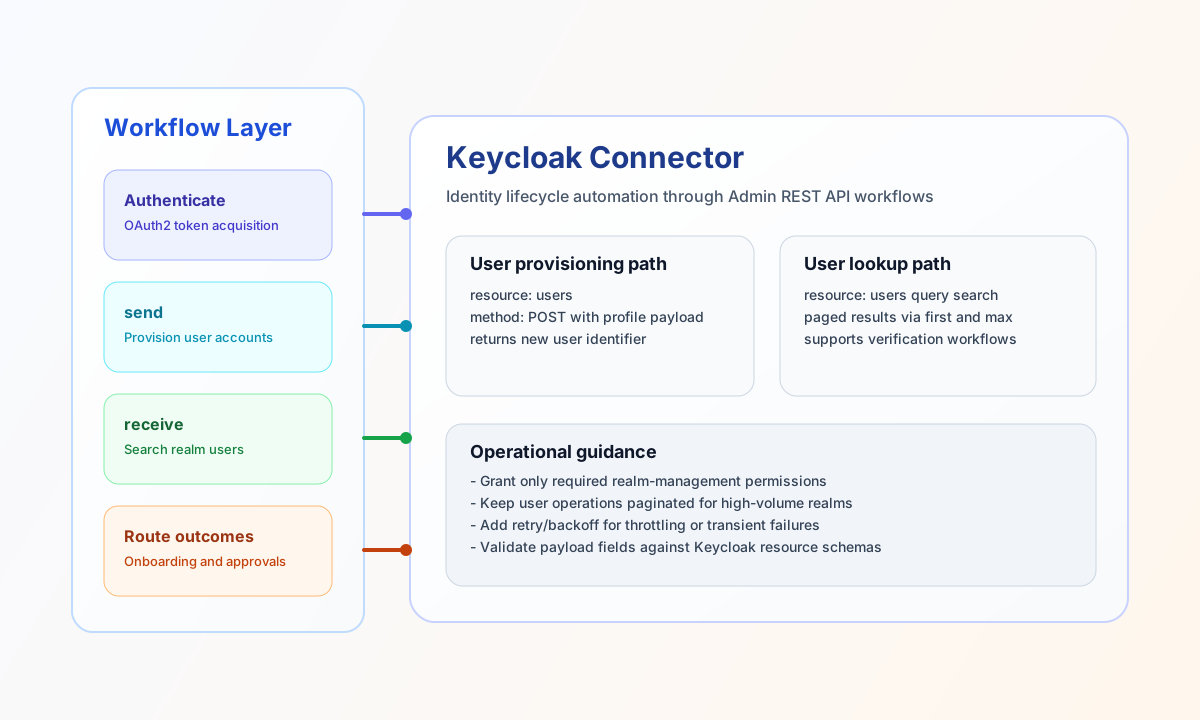
The Keycloak connector lets Tealfabric workflows manage identity resources in Keycloak through the Admin REST API. It is ideal for automated user provisioning, account lifecycle updates, and identity lookups inside business workflows.
Document information
| Field | Value |
|---|---|
| Canonical URL | /docs/04_connecting-systems/connectors/k/keycloak |
| Version (published date) | 2026-05-08 |
| Tags | connectors, reference, keycloak |
| Connector ID | keycloak-1.0.0 |
Configure authentication
Set base_url, realm, and client_id for your target Keycloak environment, then provide client_secret when using a confidential client. If your setup requires password grant instead, configure admin_username and admin_password with an account that has required realm-management permissions.
The connector handles token acquisition and refresh automatically, so you do not need to store or rotate access tokens in your workflow code. Use least-privilege service-account roles to reduce operational risk.
Provision users with send
Use send when workflows create or update Keycloak users and related identity fields. This is commonly used for onboarding, automated account enablement, and profile sync from external systems.
const baseUrl = "https://api.example.com/api/v1";
const tenantId = "<TENANT_ID>";
const apiKey = "<API_KEY>";

async function createUser(integrationId: string) {
  const response = await fetch(`${baseUrl}/integrations/${encodeURIComponent(integrationId)}/execute`, {
    method: "POST",
    headers: {
      "X-API-Key": apiKey,
      "X-Tenant-ID": tenantId,
      "Content-Type": "application/json",
    },
    body: JSON.stringify({
      operation: "send",
      resource: "users",
      method: "POST",
      data: {
        username: "jane.doe",
        email: "jane.doe@example.com",
        firstName: "Jane",
        lastName: "Doe",
        enabled: true
      }
    }),
  });
  if (!response.ok) throw new Error(`Request failed: ${response.status}`);
  return response.json();
}
curl -X POST "https://api.example.com/api/v1/integrations/<ENTITY_ID>/execute" \
-H "X-API-Key: <API_KEY>" \
-H "X-Tenant-ID: <TENANT_ID>" \
-H "Content-Type: application/json" \
-d '{
"operation": "send",
"resource": "users",
"method": "POST",
"data": {
"username": "jane.doe",
"email": "jane.doe@example.com",
"firstName": "Jane",
"lastName": "Doe",
"enabled": true
}
}'
{
  "success": true,
  "data": {
    "message": "Keycloak users created successfully",
    "resource_id": "9f2db3e9-3c98-4ee4-94d8-3f7ef17f48d6",
    "result": {
      "id": "9f2db3e9-3c98-4ee4-94d8-3f7ef17f48d6"
    }
  }
}
Retrieve users with receive
Use receive to search or list users in a realm for verification, routing, or approval logic. Pagination fields such as first and max help keep responses predictable during bulk operations.
const baseUrl = "https://api.example.com/api/v1";
const tenantId = "<TENANT_ID>";
const apiKey = "<API_KEY>";

async function findUsers(integrationId: string) {
  const response = await fetch(`${baseUrl}/integrations/${encodeURIComponent(integrationId)}/execute`, {
    method: "POST",
    headers: {
      "X-API-Key": apiKey,
      "X-Tenant-ID": tenantId,
      "Content-Type": "application/json",
    },
    body: JSON.stringify({
      operation: "receive",
      resource: "users",
      search: "jane.doe",
      first: 0,
      max: 20
    }),
  });
  if (!response.ok) throw new Error(`Request failed: ${response.status}`);
  return response.json();
}
curl -X POST "https://api.example.com/api/v1/integrations/<ENTITY_ID>/execute" \
-H "X-API-Key: <API_KEY>" \
-H "X-Tenant-ID: <TENANT_ID>" \
-H "Content-Type: application/json" \
-d '{
"operation": "receive",
"resource": "users",
"search": "jane.doe",
"first": 0,
"max": 20
}'
{
  "success": true,
  "data": {
    "message": "Keycloak data retrieved successfully",
    "item_count": 1,
    "items": [
      {
        "id": "9f2db3e9-3c98-4ee4-94d8-3f7ef17f48d6",
        "username": "jane.doe",
        "email": "jane.doe@example.com"
      }
    ]
  }
}
Run custom admin endpoints with execute
Use execute for Keycloak Admin API paths that are not covered by your send/receive workflow payload shape. The connector automatically prefixes the endpoint with admin/realms/{realm}/ when needed.
curl -X POST "https://api.example.com/api/v1/integrations/<ENTITY_ID>/execute" \
  -H "X-API-Key: <API_KEY>" \
  -H "X-Tenant-ID: <TENANT_ID>" \
  -H "Content-Type: application/json" \
  -d '{
    "operation": "execute",
    "endpoint": "users/count",
    "method": "GET"
  }'
{
  "success": true,
  "data": {
    "message": "Keycloak method executed successfully",
    "result": {
      "count": 42
    }
  }
}
Validate connectivity with test
Use test to verify token acquisition and realm reachability before running production workflows.
curl -X POST "https://api.example.com/api/v1/integrations/<ENTITY_ID>/execute" \
  -H "X-API-Key: <API_KEY>" \
  -H "X-Tenant-ID: <TENANT_ID>" \
  -H "Content-Type: application/json" \
  -d '{
    "operation": "test"
  }'
{
  "success": true,
  "data": {
    "message": "Keycloak connection test successful",
    "details": {
      "base_url": "https://keycloak.example.com",
      "realm": "master",
      "realm_name": "master"
    }
  }
}
Reliability guidance
Most runtime failures come from missing realm-management roles, incorrect resource identifiers, or malformed payloads for target resources. If operations fail, verify client permissions first and then compare request fields with the Keycloak Admin API schema for the resource you are calling.
For production stability, add retry/backoff behavior for temporary throttling and keep bulk operations paginated. This helps identity workflows stay responsive without overwhelming the Keycloak server.