UKG Workforce Management Connector Guide
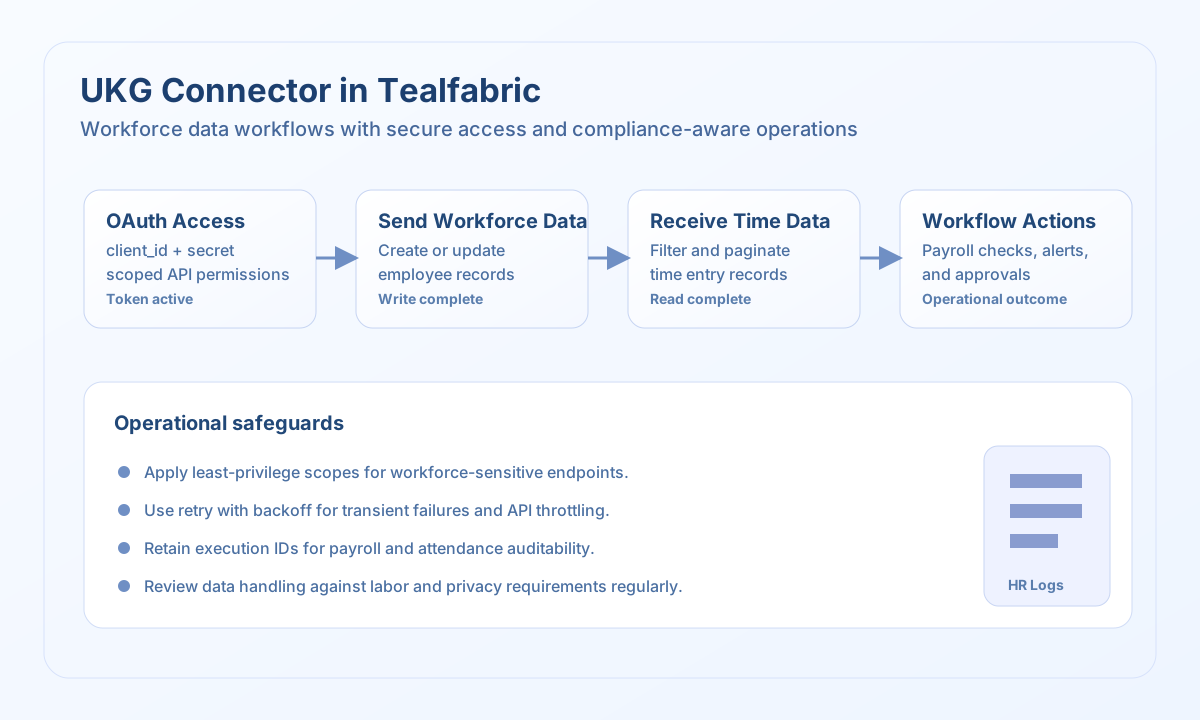
The UKG connector allows Tealfabric workflows to exchange workforce data such as employee records, schedules, and time entries through UKG APIs. It is intended for HR and operations automations where reliable synchronization and permission-aware access are critical.
Document information
| Field | Value |
|---|---|
| Canonical URL | /docs/04_connecting-systems/connectors/u/ukg |
| Version (published date) | 2026-05-08 |
| Tags | connectors, reference, ukg |
| Connector ID | ukg-1.0.0 |
When to use this connector
Use this connector when workflows need to push workforce updates into UKG or read UKG data to drive approvals, payroll preparation, or reporting. Typical scenarios include onboarding synchronization, schedule exports, and attendance reconciliation. The connector is most effective when integrations are built with clear ownership for compliance-sensitive data handling.
Prerequisites
Before configuring the integration, create an OAuth application in UKG and assign only the API permissions required by your workflows. Confirm base_url, client_id, and client_secret, and validate access in a non-production environment first. Establish governance for secret rotation and audit logging before production cutover.
Configuration
Store these values in the integration profile:
base_url(required): UKG API base URL.client_id(required): OAuth client ID.client_secret(required): OAuth client secret.timeout_seconds(optional): Request timeout in seconds, default30.
Create employee records with send
Use send to create or update workforce records in UKG. Keep payloads constrained to required fields and approved attributes so validation is predictable and policy compliant.
const baseUrl = "https://api.example.com/api/v1";
const tenantId = "<TENANT_ID>";
const apiKey = "<API_KEY>";

type UkgWriteResult = {
  entity_key?: string;
  status?: string;
};

async function createEmployee(integrationId: string): Promise<UkgWriteResult> {
  const response = await fetch(
    `${baseUrl}/integrations/${encodeURIComponent(integrationId)}/execute`,
    {
      method: "POST",
      headers: {
        "X-API-Key": apiKey,
        "X-Tenant-ID": tenantId,
        "Content-Type": "application/json",
      },
      body: JSON.stringify({
        operation: "send",
        entity: "employees",
        method: "POST",
        data: {
          employeeNumber: "EMP-2048",
          firstName: "Jordan",
          lastName: "Lee",
          email: "jordan.lee@example.com",
          hireDate: "2026-05-08",
          jobTitle: "Operations Analyst",
          department: "Operations",
        },
      }),
    }
  );
  if (!response.ok) throw new Error(`Request failed: ${response.status}`);
  const payload = (await response.json()) as { result?: UkgWriteResult };
  if (!payload.result) throw new Error("Missing UKG write payload");
  return payload.result;
}
curl -X POST "https://api.example.com/api/v1/integrations/<ENTITY_ID>/execute" \
-H "X-API-Key: <API_KEY>" \
-H "X-Tenant-ID: <TENANT_ID>" \
-H "Content-Type: application/json" \
-d '{
"operation": "send",
"entity": "employees",
"method": "POST",
"data": {
"employeeNumber": "EMP-2048",
"firstName": "Jordan",
"lastName": "Lee",
"email": "jordan.lee@example.com",
"hireDate": "2026-05-08",
"jobTitle": "Operations Analyst",
"department": "Operations"
}
}'
{
  "success": true,
  "result": {
    "entity_key": "EMP-2048",
    "status": "created"
  }
}
Retrieve time entries with receive
Use receive for filtered reads that support payroll checks, overtime controls, and exception review workflows. Keep filters narrow and apply pagination for large result sets.
const baseUrl = "https://api.example.com/api/v1";
const tenantId = "<TENANT_ID>";
const apiKey = "<API_KEY>";

type TimeEntry = {
  employeeId?: string;
  date?: string;
  startTime?: string;
  endTime?: string;
  hours?: number;
};

async function listRecentTimeEntries(integrationId: string): Promise<TimeEntry[]> {
  const response = await fetch(
    `${baseUrl}/integrations/${encodeURIComponent(integrationId)}/execute`,
    {
      method: "POST",
      headers: {
        "X-API-Key": apiKey,
        "X-Tenant-ID": tenantId,
        "Content-Type": "application/json",
      },
      body: JSON.stringify({
        operation: "receive",
        entity: "timeEntries",
        filter: "date ge '2026-05-01'",
        fields: ["employeeId", "date", "startTime", "endTime", "hours"],
        top: 25,
        skip: 0,
      }),
    }
  );
  if (!response.ok) throw new Error(`Request failed: ${response.status}`);
  const payload = (await response.json()) as { entities?: TimeEntry[] };
  if (!payload.entities) throw new Error("Missing UKG read payload");
  return payload.entities;
}
curl -X POST "https://api.example.com/api/v1/integrations/<ENTITY_ID>/execute" \
-H "X-API-Key: <API_KEY>" \
-H "X-Tenant-ID: <TENANT_ID>" \
-H "Content-Type: application/json" \
-d '{
"operation": "receive",
"entity": "timeEntries",
"filter": "date ge '\''2026-05-01'\''",
"fields": ["employeeId", "date", "startTime", "endTime", "hours"],
"top": 25,
"skip": 0
}'
{
  "success": true,
  "record_count": 1,
  "entities": [
    {
      "employeeId": "EMP-2048",
      "date": "2026-05-07",
      "startTime": "09:01",
      "endTime": "17:06",
      "hours": 8.08
    }
  ]
}
Reliability and compliance guidance
UKG integrations often handle regulated workforce data, so apply least-privilege permissions and strong audit logging for all write operations. Use bounded retries with backoff for rate-limit and transient network errors, and keep synchronization jobs checkpointed for safe resume behavior. Validate schema and policy assumptions regularly with HR and payroll stakeholders as business rules evolve.