Process flows as custom AI agent tools
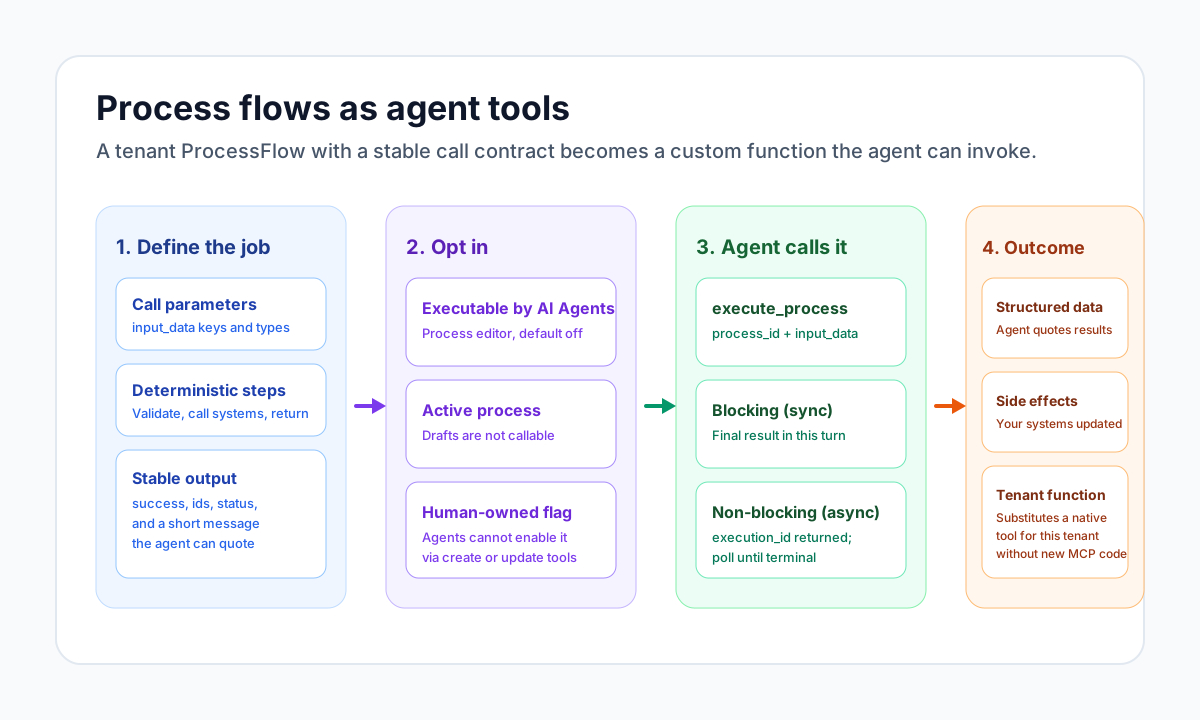
A ProcessFlow is a named sequence of steps that does a predefined job from a call payload. When you turn on Executable by AI Agents, Trace AI (and other MCP agents) can invoke that process as a custom tool: they pass parameters, the steps run, and they receive a structured result. Tenant skills teach the agent when and how to work; process flows substitute native tools with your own tenant functions.
Document information
| Field | Value |
|---|---|
| Canonical URL | /docs/07_ai-agents-and-mcp/28_process-flows-as-agent-tools |
| Version (published date) | 2026-09-21 |
| Tags | ai, agents, processflow, mcp, trace-ai, tools |
Why this exists
Native MCP tools (list_entities, execute_tenant_integration, query_datapool, and the rest) are platform-wide. They do not know your pricing rules, your case-creation checklist, or the three systems you must call in a fixed order to look up a company.
A tenant ProcessFlow fills that gap. You design the steps once. The agent does not invent the procedure: it calls the process with parameters, the same way it would call a native function. The work inside the process can be simple (validate and write one DataPool row) or complex (integrations, nested process calls, OCR, or further LLM calls in a step). The tool surface the agent sees stays the same: process_id plus input_data.
Skills, native tools, and process tools
Keep these three layers distinct.
| Layer | What it is | Who authors it | What the agent does |
|---|---|---|---|
| Tenant skill | A playbook: tone, sequence, stop rules | A folder under your tenant SKILLS/ | Calls load_tenant_skill and follows SKILL.md |
| Native MCP tool | A platform function | Tealfabric | Calls list_entities, execute_tenant_integration, and similar catalog tools |
| Process as a tool | A tenant-specific function | Your ProcessFlow | Calls execute_process with your process_id and input_data |
A skill cannot perform a side effect by itself. A native tool cannot encode your multi-step business procedure. The process is the function; the skill (optional) is the usage guide that tells the agent which process to call, with which fields, and when not to call it.
The closest platform parallel is Executable by AI Agents on an integration. That flag exposes one connector operation. A process-as-tool exposes a whole tenant workflow as one call.
What the agent actually calls
Agents do not receive a new MCP tool name per process. They use the shared execute_process tool after loading the processes platform skill (load_platform_skill with skill_id: processes).
Typical sequence:
load_platform_skill (processes)
  → list_processes / get_process
  → describe_process
  → request_human_input (confirm, for production side effects)
  → execute_process
  → if async: get_process_execution until is_terminal
describe_process is the contract lookup. It reports whether executable_by_ai_agents is on, which execute fields are accepted, and that status polling uses get_process_execution / list_process_executions.
Example blocking call (the agent needs the result in this turn):
{
  "process_id": "proc_credit_check_company",
  "async": false,
  "input_data": {
    "business_id": "1234567-8",
    "country": "FI"
  }
}
Example non-blocking call (long work):
{
  "process_id": "proc_invoice_intake",
  "async": true,
  "input_data": {
    "document_path": "inbox/invoices/2026-09-21-acme.pdf"
  }
}
The first step of the process sees that object as process_input. Later steps receive the previous step’s data object. Design the first step as the parameter validator for the tool.
Design the process like a function
Treat the ProcessFlow as an API you are publishing to the agent.
Name and describe the job
Use a function-like process name (credit-check-company, send-quote-email, create-support-case). Put the call contract in the process description: required keys, types, side effects, and the JSON fields the agent should expect back. Agents read name and description through list_processes / get_process / describe_process.
Optionally add a JSON Schema on the first step’s input_schema. That helps humans in the editor and keeps the contract visible next to the code.
Keep the call boundary deterministic
The agent should not improvise the procedure. Given the same input_data, the process should do the same job:
- Validate required parameters and fail with
{ success: false, error: { code, message } }when they are missing. - Perform the work (DataPool, integrations, files, nested processes, optional LLM steps).
- Return a small, stable
{ success: true, data: { ... } }object.
Internal steps may call llm.callLLM, connectors, or other processes. That does not make the tool non-deterministic from the agent’s point of view: the agent still passes typed parameters and receives a typed result. Constrain LLM steps (labels, JSON schema, validation against an allowlist) so downstream branches stay predictable. See Using LLM in ProcessFlow.
Do not ask the agent to invent record ids. Require them as parameters, or have the process create them and return them.
Example first step
const businessId = String(process_input.business_id ?? "").trim();
const country = String(process_input.country ?? "FI").trim();

if (businessId === "") {
  return {
    success: false,
    error: { code: "VALIDATION_ERROR", message: "business_id is required" },
  };
}

return {
  success: true,
  data: { business_id: businessId, country },
};
Later steps consume business_id and country from that data object.
Turn the process into an agent tool
- Build and test the process from Processes in the console. Use Execute Process with sample JSON until the output shape is stable. Prefer the same
input_datayou expect the agent to send. - Keep the process active (or published). Inactive or archived processes are not executable.
- Open the process, go to the Edit tab, and enable Executable by AI agents. Save. The flag is off by default.
- Tell operators and authors that agents cannot set this flag through
create_processorupdate_process. If Trace AI reports the process is not executable by AI agents, a person must toggle it in the editor.
The same flag also gates Autonomic Agent execute_process dispatch. Unattended agents additionally need the process id on their Allowed process ids list. See Autonomic Agents.
Blocking (sync) vs non-blocking (async)
Pass async explicitly on every execute_process call.
| Mode | Parameter | Best for | What the agent gets back |
|---|---|---|---|
| Blocking (sync) | "async": false | Fast lookups, validation, small writes the agent must quote in this reply | The final process output in the same tool result |
| Non-blocking (async) | "async": true | OCR, multi-integration chains, nested processes, LLM-heavy steps, anything that may outlive a chat turn | data.execution_id (and usually queue_id) immediately |
Async follow-up:
- Store
data.execution_idfromexecute_process. - Call
get_process_executionwith that id. - If
foundis false andexecution_statusispending, the worker has not written a journal row yet — wait and poll again. - If
execution.execution_statusisrunning, keep polling. - When
is_terminalis true (completed,failed, orerror), readexecution.error_messageandsteps. Do not claim success or failure before that.
Use agent_wait between polls (for example 2s → 5s → 10s → 30s). For a journal of recent runs, use list_process_executions with the process_id.
Sync execution can be disabled on some API deployments (SYNC_PROCESS_EXECUTION_ENABLED). If a sync call fails with that policy, retry with "async": true and poll. Prefer async whenever you are unsure about duration.
Example use cases
Each example is a tenant function you would otherwise wish existed as a native MCP tool.
Company registry lookup
Parameters: business_id, optional country.
Steps: validate id → call your read-only business-information integration → map fields to a tenant shape (legal_name, status, registered_address).
Mode: sync.
Why a process: the agent should not know your connector id, path, or field mapping. The process is the lookup tool.
Credit check or KYC pack
Parameters: business_id, entity_id.
Steps: registry lookup → sanctions/screening integration → write a DataPool row → return decision (clear, refer, block) and run_id.
Mode: sync if both APIs are fast; otherwise async.
Why a process: several systems, one decision object the agent can explain.
Create a support case from chat
Parameters: customer_entity_id, summary, priority, optional attachment_path.
Steps: validate the entity exists → create or update a case record → notify the queue → return case_id.
Mode: sync.
Why a process: your case model is not a native create_entity call; the process encodes required fields and notifications.
Send a governed email
Parameters: to, template_id, variables.
Steps: resolve the template → render with only allowlisted variables → send through your SMTP integration → return message_id.
Mode: sync.
Why a process: the agent must not compose arbitrary mail. The process is a send-template tool, not a free-form execute_tenant_integration.
Invoice intake (OCR + extract + store)
Parameters: document_path.
Steps: OCR the file → LLM extract of vendor, dates, and line totals with schema validation → insert DataPool rows → return invoice_id and confidence.
Mode: async.
Why a process: long, multi-stage work with a later LLM call inside the process, not in the chat tool loop.
Quote or price calculation
Parameters: product_id, quantity, customer_entity_id, optional currency.
Steps: load price list and contract terms → apply deterministic discounts → return unit_price, total, valid_until.
Mode: sync.
Why a process: pricing rules belong in code and data you control, not in a prompt.
Document pack generation
Parameters: contract_id, locale.
Steps: load contract and related entities → fill templates → write a PDF under tenant files → return file_path.
Mode: async.
Why a process: slow rendering; the agent only needs the path when it is ready.
Entity enrichment from an ERP
Parameters: entity_id.
Steps: read the entity → call the ERP integration → update allowed fields → return a before/after summary.
Mode: sync or async depending on the ERP.
Why a process: a guarded write with a field allowlist, instead of asking the agent to call update_entity with guessed columns.
Pair a tenant skill with the process
When several people will ask for the same job in chat, add a tenant skill that names the process. The skill does not replace execute_process; it tells Trace AI when to load processes and which process_id and fields to use.
Example SKILLS/credit-check/SKILL.md:
# Company credit check

When the user asks to credit-check a company, do not call native
integrations directly.

## Inputs
- business_id (required)
- country (optional, default FI)

## Sequence
1. Load the processes platform skill.
2. describe_process for proc_credit_check_company.
3. If executable_by_ai_agents is false, ask the user to enable
   Executable by AI Agents in the process editor. Stop.
4. Confirm with request_human_input.
5. execute_process with async false and the inputs above.
6. Reply with decision, legal_name, and run_id from the result.
   Do not invent a decision if the process failed.
See the Tenant skills user guide for package layout. Declaring execute_process in skill.json capabilities.tools does not grant the tool; the processes platform skill must still be loaded, and the flag must still be on.
Safety and boundaries
- Default deny. New processes are not agent-callable until a person enables the flag.
- Human confirmation. Production side effects should go through
request_human_inputwithkind: confirmbeforeexecute_process. A Markdown “please confirm” in chat is not a confirmation card. - Prompt trust. After
web_fetchor similar blob ingest in the same tool loop, platform mutation tools includingexecute_processare denied. Fetch and execute in separate turns, or keep untrusted content out of the loop. See MCP guardrails — prompt trust. - Same sandbox as any process. Agent-started runs use the ProcessFlow sandbox, tenant isolation, and your step secrets. They do not bypass sandbox guardrails.
- Least privilege on integrations. Prefer a process that calls a tightly scoped integration over enabling Executable by AI Agents on a broad write integration.
- Do not opt in high-risk flows casually. Payroll, user admin, irreversible deletes, and unrestricted outbound email should stay flag-off unless the contract, logging, and HITL path are explicit.
Troubleshooting
| Symptom | What to check |
|---|---|
| Agent says the process is not executable by AI agents | Edit tab → Executable by AI Agents is on; process status is active. A person must toggle the flag. |
execute_process is not available | Trace AI loaded load_platform_skill with skill_id: processes. Tool gating only exposes execute after that skill (or a composition that includes it). |
| Sync call rejected | Deployment may disable sync execution. Use "async": true and poll get_process_execution. |
| Agent claims success while the job is still running | Async path: require is_terminal from get_process_execution. Pending with found: false means keep polling. |
| Wrong or missing parameters | First step must validate process_input. Document keys in the process description and first-step input_schema. Test with Execute Process using the same JSON. |
Agent tries to set the flag via update_process | Expected denial. Toggle it in the console. |
| Autonomic Agent does not start the process | Flag on and process_id in that agent’s allowed process ids. Empty allowlist means no dispatch. |
| Wanted a native-style tool name per process | Not supported. One execute_process tool; distinguish jobs by process_id and description. |