Tenant skills user guide
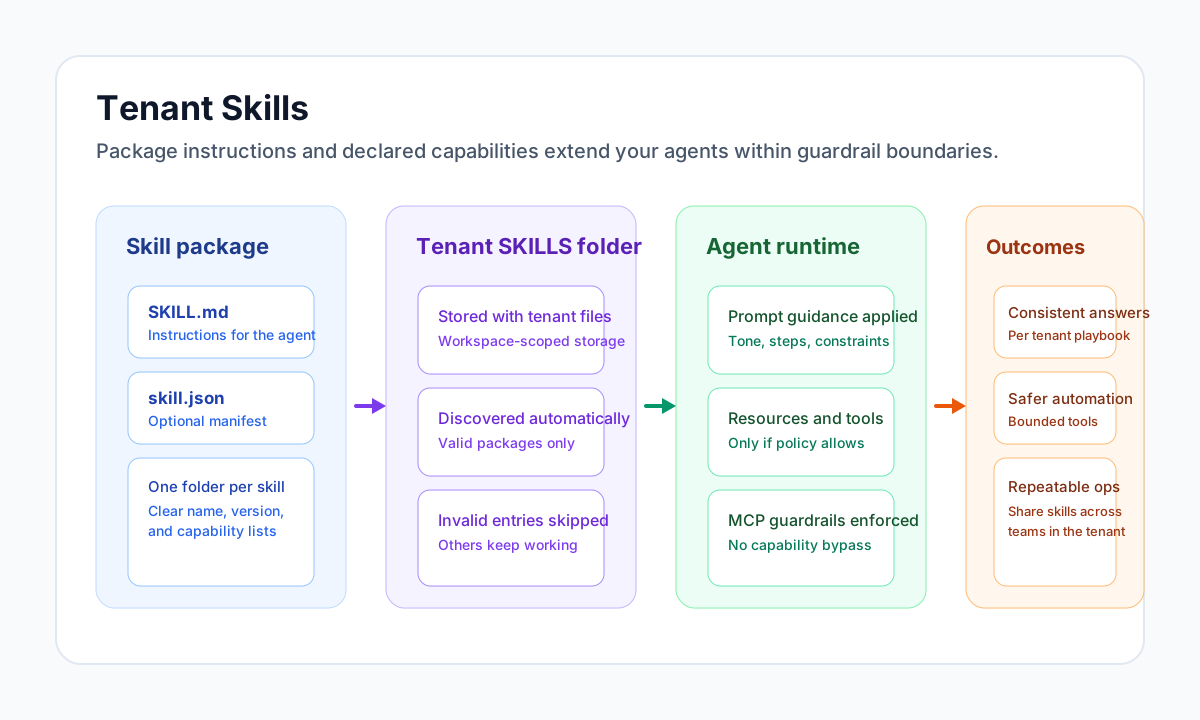
Tenant skills let you teach Tealfabric how your organization works without changing application code. Each skill is a small package of written instructions and optional capability declarations. When the package is placed in your tenant workspace, Trace AI can load it on demand during chat.
Document information
| Field | Value |
|---|---|
| Canonical URL | /docs/07_ai-agents-and-mcp/15_tenant-skills-user-guide |
| Version (published date) | 2026-08-20 |
| Tags | ai, agents, skills, mcp, trace-ai |
What a skill is
A skill is not a separate application. It is a portable instruction set: a named folder that tells an agent what to prioritize, how to phrase work, and which supporting actions it may request. Skills are meant for durable knowledge, such as how to triage support tickets, how to summarize documents in your house style, or which escalation rules apply in your region.
Skills complement one-off chat messages because the guidance can be loaded again in later turns until context limits trim older tool results.
A skill is not a substitute for a native MCP tool. When the agent must perform a predefined tenant job (credit check, template email, invoice intake), author a ProcessFlow, enable Executable by AI Agents, and optionally point the skill at that process_id. See Process flows as custom AI agent tools.
Package layout
Create a top-level folder named SKILLS in your tenant workspace file storage. Inside it, add one subfolder per skill. Filenames and the folder name are case-sensitive.
SKILLS/
  invoice-review/          ← skill_id (folder name)
    SKILL.md               ← required
    skill.json             ← optional
If you manage tenant files through Workspace → Documents, create the SKILLS path there. If your operations team deploys tenant files through a release process, include the SKILLS tree in that deployment.
When you add, change, or remove a skill folder, Trace AI discovers valid packages on the next chat run that builds MCP context. Folders without SKILL.md or with an invalid folder name are skipped so one broken package does not hide the rest. A folder that is discovered but has invalid skill.json is rejected at load time (Skill manifest rejected: …).
Folder name (skill_id)
The folder name is the skill_id passed to load_tenant_skill. skill.json name does not alias or replace it.
Allowed characters: letters, digits, underscore, hyphen. Length 1–64. Pattern:
^[a-zA-Z0-9_-]{1,64}$
| Valid folder names | Invalid folder names |
|---|---|
invoice-review | invoice review (space) |
sales_collector | sales.collector (dot) |
SalesCollector | sales/contact (slash; would be nested folders) |
a1 | empty, or longer than 64 characters |
Ask Trace AI to load the folder name. If the folder is sales-collector, load sales-collector, not a display title from SKILL.md or skill.json. In Chat, you can also type / at a word start and pick that folder name; see Chat shortcuts and quick links.
Required and optional files
| File | Required | Rules |
|---|---|---|
SKILL.md | Yes | Exact name. UTF-8, non-empty after trim. Not a directory. |
skill.json | No | Exact name. UTF-8 JSON object (not an array). If present, every supplied field is validated. |
Do not use skill.md, README.md, or Skill.json. Those names are not discovered or loaded.
Enabling skills in your environment
Use Trace AI in chat or POST /api/v1/chat/trace-ai from automation. Other agents (for example Assistant or Platform Engineer Agent) do not expose load_tenant_skill. If skills do not appear or never load, ask your platform operator whether Trace AI and tenant skills are enabled for your deployment (CHAT_TENANT_SKILLS_ENABLED).
See Trace AI Agent for endpoints, access, and examples.
The SKILL.md file
Write SKILL.md in plain Markdown. The whole file is returned to Trace AI when the skill loads (subject to normal model context budgets on tool history).
Start with a level-one heading on its own line:
# Invoice review
That heading becomes the default description when you omit description in skill.json. The heading must start with # (hash, space, then title). Headings that use ## only, or #Title with no space, are not used as the default description.
The body should read like guidance to a capable colleague. Useful sections:
- When to use the skill, and when not to
- Required inputs (names and types)
- Ordered steps, including which existing MCP tools to call
- Output format
- Stop rules (do not invent data, do not skip steps)
Keep instructions specific enough to change behavior but general enough to age well. Name MCP tools only when they already exist in your tenant catalog. Long skills are acceptable.
Minimal valid SKILL.md:
# Invoice review

Review incoming invoices against purchase-order rules.

## Inputs
- invoice_path (required)

## Sequence
1. Read the invoice file.
2. Compare line items to the purchase order.
3. Return a table of mismatches. Do not invent line items.

## Stop
If the invoice or purchase order is missing, stop and report the gap.
The skill.json manifest (optional)
skill.json is optional. When omitted, the loader uses:
| Field | Default |
|---|---|
name | Folder name |
version | 1.0.0 |
description | First # heading in SKILL.md, or the folder name |
capabilities | Empty prompt, resources, and tools arrays |
When the file is present, it must be a JSON object. Extra keys are ignored. Missing keys still use the defaults above. Invalid values reject the skill; they are not ignored.
Field syntax
{
  "name": "invoice-review",
  "version": "1.0.0",
  "description": "Review incoming invoices against purchase-order rules.",
  "capabilities": {
    "prompt": ["Use the invoice checklist in SKILL.md"],
    "resources": [],
    "tools": ["read_file", "entity_search"]
  }
}
| Field | Type | Required | Validation |
|---|---|---|---|
name | string | No | Same pattern as the folder: ^[a-zA-Z0-9_-]{1,64}$. Should match the folder name. Spaces, dots, and slashes fail with invalid_manifest_name. |
version | string | No | Exactly three non-negative integers separated by dots: MAJOR.MINOR.PATCH. Pattern ^\d+\.\d+\.\d+$. Default 1.0.0. |
description | string | No | Non-empty after trim. Default is the first # heading in SKILL.md. Empty string fails with invalid_manifest_description. |
capabilities | object | No | Must be an object if present, not an array or string. |
capabilities.prompt | string array | No | Array of strings. Omit the key, or use []. A string or object fails with invalid_manifest_capability_prompt. |
capabilities.resources | string array | No | Opaque hint strings for the model; not platform resource UUIDs. Same array rule as prompt. |
capabilities.tools | string array | No | MCP tool names that already exist for your tenant. Declaring a name does not add tools. Same array rule as prompt. |
Empty strings inside the arrays are dropped. Arrays may be empty.
Version format (common rejection)
invalid_manifest_version means version was present but did not match MAJOR.MINOR.PATCH with digits only.
| Valid | Invalid |
|---|---|
1.0.0 | v1 |
0.0.1 | 1.0 |
2.10.3 | 1 |
1.0.0 | v1.0.0 |
1.0.0 | 1.0.0-beta |
If you do not need metadata, omit skill.json entirely rather than putting a non-semver version in it.
What capabilities does and does not do
| Field | Effect at load time |
|---|---|
prompt | Authoring hints. The instructions Trace AI must follow are the SKILL.md body. |
resources | Hints only. Trace AI fetches data with MCP tools such as get_context_resource; these strings are not auto-fetched. |
tools | Names of tools the skill intends to use. Skills cannot grant new tools or bypass guardrails. |
Put the workflow in SKILL.md. Use capabilities.tools as a checklist of tool names that already appear in the MCP catalog for that chat run.
How Trace AI uses skills
Trace AI does not copy all skills into the system prompt at the start of a conversation. When a task matches a skill, the model should call load_tenant_skill with skill_id set to your folder name:
{ "skill_id": "invoice-review" }
The platform returns the full SKILL.md body wrapped as:
<Tenant_Skill id="invoice-review" version="1.0.0">
…SKILL.md contents…
</Tenant_Skill>
That content stays in the conversation as a tool result until summarization or message budgets compress older tool history.
The list of skill ids available for your tenant appears in the load_tenant_skill tool description in the MCP tool catalog for that run.
Install one skill per concern when possible. Avoid contradictory rules across skills. Load when relevant; the agent is instructed not to reload the same skill on every message.
Authoring practices that work well
Name skills after the job they support, not after a person or a project codename. Bump version in skill.json when you make material changes so operators can tell whether a deployment updated behavior. Test by asking Trace AI the same question before and after you add the folder, with realistic tenant file paths when the skill concerns documents.
Treat skills as production configuration. Use the same change control you would for guardrails or integration credentials.
In Trace AI, you can ask the agent to create or repair a package. It should load the official tenant-skill-authoring platform skill (load_platform_skill), then write SKILLS/{id}/SKILL.md and optional skill.json in your tenant workspace. That is different from load_tenant_skill, which runs a package that is already installed.
To install a published business playbook from the Library (Marketing → Support, or the AI adoption advisor pack, DataPool schemas, handovers), ask Trace to use model-skill-import. Trace will search the tenant for Prerequisites (tables, in-app notification recipients) and ask when a value is missing or ambiguous. See Model skills library.
Safety and boundaries
Skills cannot override MCP guardrails, API key scopes, or tenant isolation. They declare intent; the platform enforces what is actually allowed. If a skill lists a tool that your guardrails block, that tool remains unavailable. Declared capabilities.tools are intersected with platform-granted tools at runtime; they cannot unlock new MCP tools. Writes under SKILLS/ require tenant-skill-authoring and are blocked in the same tool loop after external blob ingest (web_fetch, etc.).
For guardrail and prompt-trust details, see MCP guardrails configuration schema.
Example: a document review skill
Create SKILLS/document-review/SKILL.md:
# Document review

Summarize an attached or named tenant file.

## Sequence
1. Identify the file path.
2. Read the file.
3. Reply with Purpose, Risks, and Recommended actions, in that order.
Optional SKILLS/document-review/skill.json:
{
  "name": "document-review",
  "version": "1.0.0",
  "description": "Summarize a tenant document into purpose, risks, and recommended actions.",
  "capabilities": {
    "prompt": ["Keep the three section headings in SKILL.md"],
    "resources": [],
    "tools": ["read_file"]
  }
}
Open Trace AI (not Assistant) and ask it to load document-review and summarize an attached file. Replies should follow the section order you defined.
Troubleshooting
| Symptom or loader reason | What to check |
|---|---|
| Skill never appears / unknown skill id | Using Trace AI; tenant skills enabled; folder is SKILLS/{id}/ with exact SKILL.md; skill_id equals the folder name. |
invalid_manifest_version | version must be 1.0.0-style (digits.digits.digits). Not v1, 1.0, or 1.0.0-beta. Or omit skill.json. |
invalid_manifest_name | name uses only A–Z, a–z, 0–9, _, -, max 64 characters. |
invalid_manifest_description | Provide a non-empty description, or a # Title line in SKILL.md. |
invalid_manifest_json / invalid_manifest_shape | File is valid JSON and a single { … } object, not an array. |
invalid_manifest_capability_prompt (or resources / tools) | That field is a JSON array of strings, or omitted. |
empty_skill_markdown | SKILL.md has content after trim. |
| Wrong or empty instructions | Non-empty SKILL.md; you loaded the folder name you intended. |
| Tool in manifest unavailable | Tool must already exist in MCP tools_available; adjust guardrails with your administrator. Declaring it in skill.json does not add it. |
Trace AI refuses because policy_audit.denied | Not a tenant-admin switch. Tenant skill load used to list every capabilities.tools name as denied in prompt-only mode. After a successful load, the agent should call session tools. Ask it to continue the sequence. |
| Skill applied once then “forgotten” | Normal context trimming; ask the model to call load_tenant_skill again if needed. |