Platform Engineer Agent
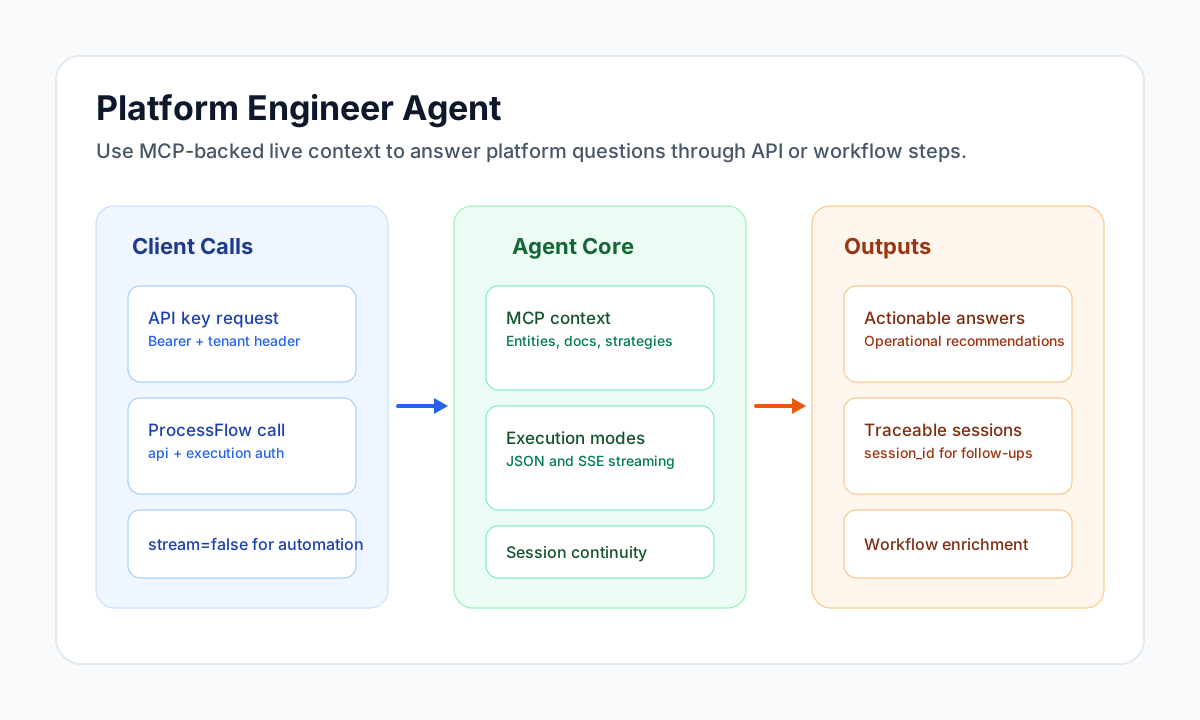
The Platform Engineer Agent is an MCP-enabled assistant that answers platform-specific questions using live Tealfabric context, including entities, strategies, docs, and tool outputs. It is exposed as an HTTP API for integrations and automation.
For chat with tenant skills loaded on demand from your SKILLS/ folder, use Trace AI instead. This agent does not register the load_tenant_skill tool.
Document information
| Field | Value |
|---|---|
| Canonical URL | /docs/07_ai-agents-and-mcp/10-Platform_Engineer_Agent |
| Version (published date) | 2026-05-08 |
| Tags | ai, reference, platform-engineer-agent |
Endpoint and access
Use the endpoint below for all requests:
POST {app_url}/api/v1/chat/platform-agent
Replace {app_url} with your Tealfabric base URL such as https://your-tenant.tealfabric.io. In ProcessFlow step code, you can use the runtime variable app_url.
This agent is typically available to tenant administrators and super administrators, subject to your environment configuration.
Authentication
You can authenticate with browser session cookies, an API key, or ProcessFlow execution context.
| Method | Usage |
|---|---|
| Session (browser) | Interactive usage from UI context with cookies. |
| API key | Server-to-server calls with X-API-Key: <API_KEY> and chat.write scope. |
| Process execution | Calls through api automatically include execution headers (X-Process-Authorization-Key, X-Tenant-ID, X-User-ID, X-Execution-ID). |
Requests without valid credentials return 401, and insufficient API key scope returns 403.
Request body
Send JSON payloads with Content-Type: application/json.
| Field | Required | Type | Description |
|---|---|---|---|
message | Yes | string | User instruction or question. Must not be empty. |
stream | No | boolean | true (default) for SSE streaming; false for a single JSON response. |
agent | No | string | Agent label for logging; default platform_agent. |
timestamp | No | string | Optional ISO 8601 time hint. |
session_id | No | string | Existing chat session id for multi-turn continuity. |
attached_files | No | array | Tenant file references (path, optional name) appended as context. |
Example request with file context:
{
  "message": "Explain what this tenant configuration controls.",
  "stream": false,
  "attached_files": [
    { "path": "platforms/12/config-notes.txt", "name": "config-notes.txt" }
  ]
}
Response behavior
When stream is false, the response is JSON:
{
  "success": true,
  "session_id": "chat-session-uuid",
  "content": "Assistant reply text...",
  "error": null
}
When stream is true, the response is text/event-stream and emits SSE payloads such as session_info, chunk, tool_progress, complete, and error. Streams usually terminate with data: [DONE].
API call examples
Use non-streaming mode for automation scripts and workflow steps because it returns a single JSON payload that is easier to validate and persist.
const baseUrl = "https://api.example.com/api/v1";
const tenantId = "<TENANT_ID>";
const apiKey = "<API_KEY>";

async function askPlatformEngineer(message: string) {
  const response = await fetch(`${baseUrl}/chat/platform-agent`, {
    method: "POST",
    headers: {
      "X-API-Key": apiKey,
      "X-Tenant-ID": tenantId,
      "Content-Type": "application/json",
    },
    body: JSON.stringify({
      message,
      stream: false,
      agent: "platform_agent"
    }),
  });
  if (!response.ok) throw new Error(`Request failed: ${response.status}`);
  const payload = await response.json();
  if (!payload.success) throw new Error(payload.error ?? "Agent call failed");
  return payload;
}
curl -X POST "https://api.example.com/api/v1/chat/platform-agent" \
-H "X-API-Key: <API_KEY>" \
-H "X-Tenant-ID: <TENANT_ID>" \
-H "Content-Type: application/json" \
-d '{
"message": "List platform strategies and flag risky gaps.",
"stream": false,
"agent": "platform_agent"
}'
{
  "success": true,
  "session_id": "<ENTITY_ID>",
  "content": "You currently have three platform strategies configured. The main risk is missing fallback automation for incident escalation.",
  "error": null
}
ProcessFlow usage
In ProcessFlow, call this endpoint through api and keep stream: false so your step can parse a single JSON result. This mode is easier to validate, map into process_output, and retry safely on failure.
The execution runtime automatically adds process-auth headers, so avoid manually injecting sensitive execution credentials unless your client cannot set headers.
See also
- Trace AI Agent (MCP chat with tenant skills)
- Tenant skills user guide
- API endpoints
- API key management
- Process environment variables