MCP guardrails configuration schema
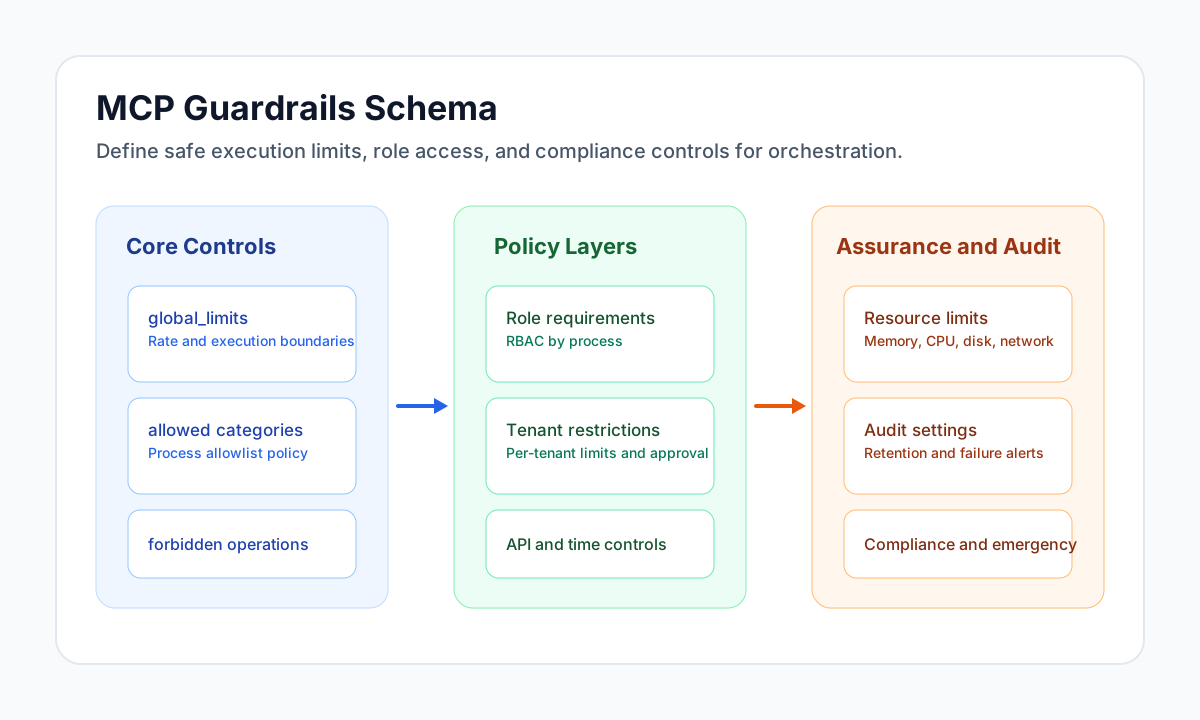
This reference defines the JSON structure used by MCP guardrails configurations. Guardrails control which orchestration actions are allowed, how frequently they can run, and which safety checks must pass before execution.
Document information
| Field | Value |
|---|---|
| Canonical URL | /docs/07_ai-agents-and-mcp/05_mcp-guardrails-configuration-schema |
| Version (published date) | 2026-09-08 |
| Tags | mcp, ai, security |
Purpose and scope
Use this schema when you define global or tenant-specific control policies for LLM-driven orchestration. A valid configuration should enforce safe defaults, preserve operational flexibility, and remain easy to audit over time.
This page focuses on field-level structure and validation behavior, not runtime implementation details.
URI pattern
Guardrails resources use the following MCP URI family:
config://tealfabric/orchestrator/guardrails
Common forms:
config://tealfabric/orchestrator/guardrailsfor global defaults.config://tealfabric/orchestrator/guardrails/{tenant_id}for tenant overrides.
Required and optional fields
A valid guardrails document must include the following required keys:
{
  "version": "1.0",
  "global_limits": {},
  "allowed_process_categories": [],
  "forbidden_operations": []
}
Optional keys extend controls for roles, tenants, APIs, time windows, resource usage, compliance, and auditing:
{
  "role_requirements": {},
  "tenant_restrictions": {},
  "api_restrictions": {},
  "time_restrictions": {},
  "resource_limits": {},
  "audit_settings": {},
  "emergency_overrides": {},
  "compliance_rules": {},
  "last_updated": "2026-05-08T20:31:00Z",
  "maintainer": "security-team@example.com"
}
Field reference
version tracks schema compatibility and uses a simple major.minor format such as 1.0 or 1.1. Increase the major version when changes are not backward compatible.
global_limits defines baseline execution controls such as maximum processes per request, maximum execution time, and maximum API calls per process. Optional fields can also cap concurrent, hourly, and daily execution volume.
allowed_process_categories declares the categories orchestration can execute, and forbidden_operations explicitly blocks high-risk actions even when a category is otherwise allowed.
role_requirements maps process identifiers to allowed roles, which enables role-based enforcement for privileged operations. tenant_restrictions adds per-tenant limits, category restrictions, and optional approval requirements.
api_restrictions, time_restrictions, and resource_limits control runtime pressure and unsafe access patterns. audit_settings, emergency_overrides, and compliance_rules define monitoring, emergency behavior, and regulated-operation safeguards.
Recommended validation constraints
Use these constraints to keep configurations predictable:
- Use positive numbers for limits, with daily limits higher than hourly limits and hourly limits higher than minute-level limits.
- Keep
allowed_process_categoriesand role lists unique to avoid ambiguous policy outcomes. - Use
HH:MMfor time-of-day values and ISO 8601 for date-time fields. - Keep emergency overrides time-bounded and restricted to privileged roles.
- Keep forbidden operations explicit for destructive actions such as tenant deletion, billing mutation, or broad export operations.
Example guardrails configuration
{
  "version": "1.0",
  "global_limits": {
    "max_processes_per_request": 5,
    "max_execution_time_seconds": 300,
    "max_api_calls_per_process": 20,
    "max_concurrent_executions": 10,
    "max_daily_executions": 1000,
    "max_hourly_executions": 100
  },
  "allowed_process_categories": [
    "platform_management",
    "entity_management",
    "data_import",
    "data_export",
    "user_management",
    "reporting",
    "integration",
    "automation",
    "validation"
  ],
  "forbidden_operations": [
    "delete_tenant",
    "modify_billing",
    "change_user_roles",
    "export_all_data",
    "system_shutdown",
    "database_drop",
    "file_system_delete"
  ],
  "role_requirements": {
    "platform_creation": ["platform_admin", "super_admin"],
    "entity_linking": ["platform_admin", "entity_manager"],
    "data_import": ["data_admin", "super_admin"],
    "user_management": ["user_manager", "super_admin"],
    "system_configuration": ["super_admin"],
    "reporting": ["viewer", "platform_admin", "super_admin"]
  },
  "tenant_restrictions": {
    "trial_tenants": {
      "max_processes_per_day": 10,
      "max_processes_per_hour": 2,
      "allowed_categories": ["platform_management"],
      "forbidden_processes": ["proc_data_export", "proc_bulk_operations"],
      "rate_limit_multiplier": 0.5,
      "requires_approval": true
    },
    "enterprise_tenants": {
      "max_processes_per_day": 5000,
      "max_processes_per_hour": 500,
      "rate_limit_multiplier": 2.0,
      "requires_approval": false
    }
  },
  "api_restrictions": {
    "max_calls_per_minute": 60,
    "max_calls_per_hour": 1000,
    "forbidden_apis": [
      "api://admin/users",
      "api://system/config",
      "api://billing/charges"
    ]
  },
  "time_restrictions": {
    "business_hours_only": false,
    "business_hours": {
      "start": "09:00",
      "end": "17:00",
      "timezone": "UTC",
      "weekdays_only": true
    }
  },
  "resource_limits": {
    "max_memory_mb": 512,
    "max_cpu_seconds": 60,
    "max_disk_mb": 100,
    "max_network_calls": 50,
    "max_file_size_mb": 10
  },
  "audit_settings": {
    "log_all_executions": true,
    "log_failed_executions": true,
    "retention_days": 90,
    "alert_on_failures": true,
    "alert_threshold": 5
  },
  "emergency_overrides": {
    "emergency_mode": false,
    "emergency_roles": ["super_admin"],
    "emergency_duration_hours": 4
  },
  "compliance_rules": {
    "gdpr_compliance": true,
    "sox_compliance": false,
    "hipaa_compliance": false
  },
  "last_updated": "2026-05-08T20:31:00Z",
  "maintainer": "security-team@tealfabric.io"
}
Best practices
Design policies with least privilege in mind so roles and process categories remain narrowly scoped. Combine category allowlists, explicit forbidden operations, and tenant-specific controls instead of relying on only one mechanism.
Revisit limits regularly using observed traffic and failure patterns. If limits are too strict, operations fail unnecessarily; if they are too loose, risky or expensive behavior can pass unchecked.
Keep audit and approval settings aligned with compliance obligations, and ensure emergency controls are temporary and well monitored. A strong guardrails policy should be both secure and operable under production load.
Prompt trust and tool-sequence controls
As of 2026-09-08, chat and Autonomic agents on the NestJS path enforce prompt trust in addition to orchestration guardrails above. These controls reduce prompt-injection impact; they do not replace allowlists or skill gating.
Policy files
| File | Purpose |
|---|---|
backend-next/config/policies/prompt_trust.json | Pre/post filter thresholds, blob-ingest actions, platform mutation deny list, SKILLS/ write prefixes |
backend-next/config/policies/tenant_web_fetch.json | web_fetch SSRF policy for Trace and Autonomic agents |
Validate policy JSON with npm run config:validate from backend-next/.
prompt_trust.json fields
| Field | Meaning |
|---|---|
enabled | Master switch (also gated by PROMPT_TRUST_FILTERS_ENABLED) |
max_external_message_chars / max_interactive_message_chars | Oversize messages rejected with HTTP 413 (external) or pre-filter error (interactive) |
quarantine_score_external / quarantine_score_interactive | Injection-pattern score threshold; matched spans replaced with ⟦filtered⟧ |
blob_ingest_actions | Tools that mark the loop as having ingested external bytes (web_fetch, websearch, query_datapool, download_document, …) |
platform_mutation_actions | Tools denied in the same loop after a blob ingest (with carve-outs below) |
skill_package_write_path_prefixes | Paths (e.g. SKILLS/) that require tenant-skill-authoring loaded and are denied after blob ingest |
tenant_skill_authoring_skill_id | Platform skill id required before SKILLS/ writes |
Ingress profiles
| Caller | Pre-filter ingress | Notes |
|---|---|---|
| Interactive JWT chat | interactive | Delimiter escape + envelopes; higher quarantine threshold |
API key POST /api/v1/chat/* | external | Stricter quarantine; same-turn deny applies |
process_execution (ProcessFlow → chat) | external | Process input_data treated as untrusted |
| Autonomic wake payload | external | Schedule, webhook, mailbox, backlog |
Same-turn cross-kind deny
After any tool in blob_ingest_actions succeeds in a loop, platform mutation tools are denied until the loop ends. This blocks patterns like web_fetch → execute_process driven by poisoned page content.
Carve-outs (allowlisted server-side checks still required):
process_executionrole- API-key chat
- Trace-delegated subagents (
delegated_subagent)
Untrusted envelopes
The platform wraps untrusted text before it reaches the model:
- User messages:
<User_Message untrusted="true"> - MCP context JSON:
<Context_Data trust="retrieved"> - Blob tool results:
<Untrusted_Retrieved_Data> - Autonomic mandate, backlog, mailbox: XML-escaped inside
<autonomic_*>blocks - Summaries:
<Context_Summary trust="retrieved">
Shared operator guidance is loaded from system_prompts/untrusted_data_prefix.txt.
tenant_web_fetch.json
| Field | Meaning |
|---|---|
allowed_hosts | Empty list = public HTTPS only after SSRF checks (private, link-local, and loopback addresses blocked, including redirect targets) |
timeout_ms | Fetch timeout |
max_response_bytes | Response size cap |
max_redirects | Redirect hop limit |
Environment variables (operator)
| Variable | Default | Effect |
|---|---|---|
PROMPT_TRUST_FILTERS_ENABLED | 1 | Enable pre/post filters |
CHAT_SKILLS_TOOL_GATING_ENABLED | 1 | Kernel-only tools until skills loaded |
CHAT_POLICY_DENY_UNCONFIGURED_AGENTS | 1 | Deny chat agents not in chat_agents.json |
Tenant skills and tool gating
Tenant skill.json capabilities.tools declares intent only. The platform:
- Intersects declared tools with the session's platform-granted set after
load_tenant_skill - Applies
TenantSkillPolicyGateServicein prompt-only mode - Denies
SKILLS/package writes unlesstenant-skill-authoringis loaded
See Tenant skills user guide and Trace AI Agent.
Autonomic-specific controls
allowed_process_ids:execute_processandemit_eventrespect this list; empty = no dispatchallow_wildcard_processes: Legacy*rows only; new saves require explicit flagidentity_user_id: Must belong to the tenant; cannot combinetenant_adminwith wildcard process allowlist- File jail: Autonomic file tools default to
agents/{agent_id}/prefix
See Autonomic Agents.
Audit
MCP tool invocations may include prompt_trust fields on the existing audit object: category, ingress, quarantine, pattern_ids, content_sha256. Use Monitor / tool audit views for Autonomic wakes.